How to Do a Live Podcast Recording: On Air Now!
Years ago, I was interviewed on a live podcast and asked where the mute button was. The host said there wasn’t one. I was lucky I didn’t need to cough. Live tools have improved a lot since then, but the feeling of being on the spot remains the same. It is part balance, part performance, and part adrenaline.
With that in mind, let us look at the pros and cons of going live, the gear you need, and the benefits it can bring.
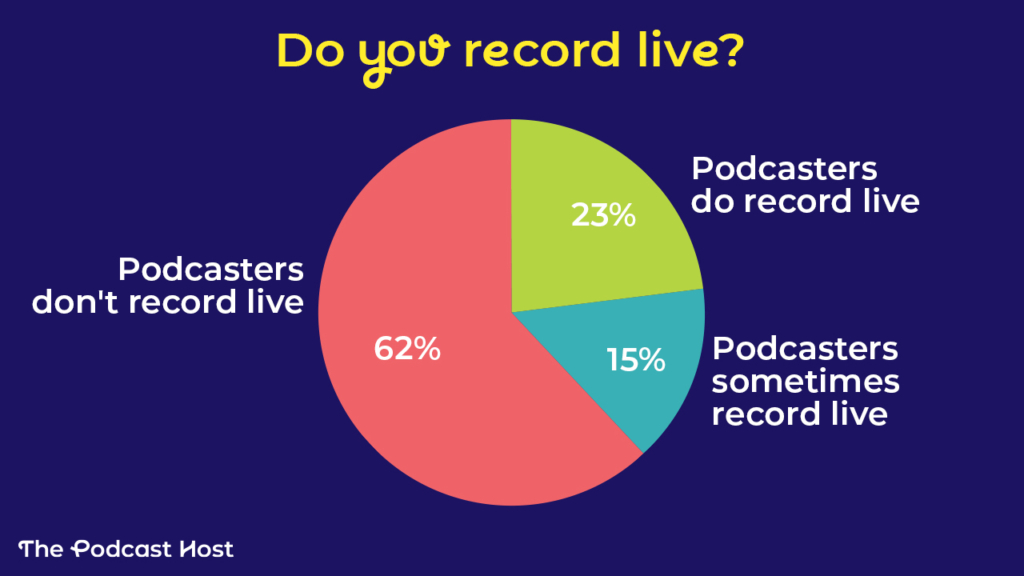
62% of podcasters never record live, so broadcasting your podcast could be a good USP. Data from our Podcaster Gear, Software, & Setups survey.
Recording a Live Podcast: Pros and Cons
Before we explore the gear and workflows, it helps to look at the main advantages and drawbacks of going live. Some of these may matter to you more than others, but together they give a clear picture of what to expect.
Benefits of Podcasting Live
Audience engagement. Producing a live podcast episode allows the audience to chat directly with you. Conversation can make them feel valued, empowering them to recommend your show to their friends and actively support your podcast.
Feedback for future episodes. When you podcast live, the audience actively participates in conversations about your show’s topic. Their questions, opinions, and information can potentially improve your show’s content. Whether the audience responses lead you to try something new that day, or in the future, you’ll explore your podcast’s topic in a way that has greater value for your audience.
That “showtime!” feeling. Loads of people are afraid of public speaking. But, taking the spotlight (or sharing it with a co-host) in front of a live audience can put some starch in your spine. You may find you articulate your words more clearly or gain enthusiasm, even simply because this experience is new and different.
Daniel Baden, of A Patient Story, told us, “I feel that with live recordings you get a more natural, human feel.”
Challenges of Podcasting Live
Attendance. It’s a challenge to get people to attend a virtual meetup. Before 2020, using Zoom made me feel like an admiral on an episode of Star Trek. Now, all webinars make me tired. Attendance is a gamble, particularly when your podcast has launched recently and you’re still finding your audience.
Time constraints. When you plan to podcast live regularly, your schedule becomes less flexible. Typically, your work is self-paced. However, podcasting live on a recurring time and date creates stricter deadlines.
Extra tasks. Podcasting live can add extra steps to your podcast workflow. You might have to learn how to use different software for the event itself. Additionally, you should promote the event not only in your podcast episodes, but also in all other marketing channels for your show. You can incentivize attendance at your live podcast with a prize drawing or a giveaway. Delivering that prize, though, may add to your task list.
Katie Paterson asked podcasters for their opinions about producing a live podcast. One said, “I think live streaming is something for particular show types and audiences. For most shows, I struggle to think what ‘live’ brings to the table.” Another podcaster said, “Since it’s interview-based, I think it could bring a different vibe. However, I’m not sure about the equipment required, and what it involves going ‘live’ without the safety net of editing!” (Don’t worry about that last one, we’ll explain.)
As you think about these pros and cons, some may stimulate your creativity, and others may bring you down. Think about these variables when determining what you’re willing and able to do. In the meantime, let’s look at the fixed elements of producing your podcast live.
Publishing Live Recordings as Podcast Episodes
After you podcast live, you can repurpose the content for future episodes. Don’t publish the recording as-is, though. Your live session will inevitably be filled with small talk, repetition, “Is this thing on?”, and so on. Edit out all the extraneous chat. Your diehard fans can experience the interactive live moment and remember it fondly. Then, let your casual listeners have the streamlined version.
Whatever you typically use to record and edit your podcast, you may need to try something different to do a live podcast. Here are some of the equipment and software tools to consider.
Equipment for Live Podcasting
Many podcasters want an analog, tactile solution to connect their hosts and guests. That’s where dedicated podcast recorders, such as Zoom’s Podtrak P4 and The Rodecaster Pro II, really shine.
The Podtrak P4 allows you to connect up to 4 XLR mics, and you can include guests via computer or smartphone.
The Rodecaster Pro II combines a digital mixer, audio interface, MIDI controller, and standalone recording in one device. Onboard processing can enhance your audio quality in real-time.
If you want to do a podcast live, and audio quality is your top priority, either device can help you keep all aspects of sound engineering under your control.
7 Software Platforms For Your Live Podcast

Data from our Podcaster Gear, Software, & Setups survey.
These platforms are some of the most widely used for live podcasting. The best choice for you will depend on where your listeners spend time and which tools match your style.
The right platform can make your live show smoother and more enjoyable for both you and your audience. The wrong one can slow you down. Knowing what each option offers will help you choose the setup that supports the way you want to host.
1. Podbean Live Stream
Our review of Podbean Live focuses on the platform’s utility as a remote recording system. Not only does this review provide details on how to conduct a live podcast with Podbean, but it also explores monetization.
Podbean has been a dependable podcasting platform for over a decade. Their longevity speaks to their durability and willingness to listen to their customers. You can set up a live stream for free, so trying it is worth your while.
2. Riverside Live Streaming Software
Riverside functions best as a recording tool. Our full review of Riverside shows how it works. The live streaming feature is an added option (as opposed to the primary purpose, such as with YouTube). You can host a live podcast with up to eight guests and have your audience listen along or participate by calling in. Plus, you can stream your live podcast directly to Facebook, YouTube, Twitch, LinkedIn, and many other social media platforms.
3. YouTube Live Streaming
Ultimately, what makes YouTube Live Streaming stand out is its broad reach and easy access. The Pew Research Center reported that 85% of adult survey respondents and 90% of teens use YouTube. Additionally, there’s a very low learning curve for creating a live podcast on YouTube or for watching a live podcast stream.
It appears that YouTube’s algorithm prefers active live streams over pre-recorded videos. So, if you record your podcast live, YouTube may prioritize your live stream in search results over pre-recorded videos for the same topic.
4. Twitch
Twitch began as a home for gamers, but it has grown into a broad live streaming platform that many podcasters now use. It attracts millions of daily viewers, and anyone can watch without creating an account. Creators can earn money through ads, paid subscriptions, and viewer donations.
Amber Devereux of Tin Can Audio uses Twitch for creative co-working and podcast promotion. “I went with Twitch because it was a site specifically designed for streaming, rather than something which had the functionality tacked on.”
Devereux clarified that Twitch provides flexibility and customization for the stream’s look and tone. In Tin Can Audio’s case, Twitch displays the chat in a transparent overlay of the shared screen, reducing clutter from multiple frames. Plus, Twitch has spam filtering and moderation tools that are especially useful for solo streamers.
Twitch may not offer the same video quality as some dedicated recording platforms, and it is not focused on podcasting alone, but it is a stable, flexible place to host live sessions and interact with an engaged community.
5. Facebook Live
If you already have a Facebook account or page that:
- Is at least 60 days old
- Has at least 100 followers
…then you can use Facebook Live. You can also podcast live using Facebook in a Group. However, it must be approved by a group administrator. The group’s privacy settings determine who can see your live podcast.
Users can also schedule Live Events in Advance. Users start as if they plan to go live immediately, except instead of selecting “Create Live Video Event,” select “Create Event.” This creates two Facebook posts: the announcement and the (future) live video post. At the scheduled time and date, Facebook displays the Live post in your profile, group, or page.
If your podcast already has a Facebook page or group, and your audience uses Facebook, this could be a great option to do a live podcast.
6. StreamYard
This cloud-based streaming platform has a minimalist interface and prides itself on ease of use. Streamyard lets you stream live to multiple platforms, including YouTube, Facebook, and LinkedIn.
I’ve used Streamyard as a guest and found the user interface simple, but the audio was compressed and tinny. However, Streamyard records separate audio and video files on each user’s device. So, even if your live podcast event sacrifices audio quality for connection, the recordings you repurpose later won’t.
Unlike YouTube or Facebook, you won’t find casual browsers surfing into your live podcast because an algorithm recommended it. And, unlike Twitch, Streamyard audiences won’t find links to others’ streams competing for their attention. The TrustPilot reviews for StreamYard, however, highlight the difficulty of cancelling subscriptions, so tread carefully with their free trial.
7. Restream
This streaming platform is the choice of companies as diverse as LinkedIn and American Idol. Like Streamyard, Restream’s multi-platform option makes it a versatile solution. Restream can link your live podcast with over 30 social media or entertainment streaming platforms. And, Restream’s chat feature allows you to read and respond to audience messages all in one window, no matter where the messages originate.
Should You Do a Live Podcast?
Going live brings energy and unpredictability, and it works best when you are confident with your tools. Having someone manage the chat or using software that handles it for you can help you stay focused on hosting.
If you want to try it, start small. Run a test session for a few supportive listeners and treat it as a chance to learn how live interaction feels. Their feedback will help you refine the format before you share it more widely.
Live podcasting can help you build confidence, connect with your audience in real time, and develop new presenting skills. It can also open doors to collaboration. If you want more ideas on how to grow with other creators, see our guide to cross promotion, and visit The Podcraft Academy for deeper training and support. We’d love to work with you in there!