Zooming Into Miniature Details in 4k: NearStream VM20 Camera
According to our recent Indie Podcasters Survey, 40% of video podcasters are interview shows. Typically, that’s two talking heads chatting remotely on a split screen.
It makes total sense. That’s the perfect format for many, and one that transfers seamlessly to working audio-only, which is how most folks consume podcasts.
But advances in camera tech are throwing up opportunities for podcasters to do more with video, from creating companion YouTube videos to bonus content.
When I see cameras like the NearStream VM20, I don’t deny that they’ll flatter your face, your shoulders, and that bookshelf you pretend you didn’t spend hours carefully arranging. But they can also help you move beyond the split screen, if you want to experiment.
NearStream VM20: The Lowdown
The NearStream VM20 is a 4K resolution streaming camera built to deliver DSLR-level quality. With its Sony Starvis sensor and a 40x hybrid zoom, it offers a lot of creative potential, even in suboptimal conditions.
A quick heads up to say that NearStream sent us the VM20 for review purposes. Our link is an affiliate, which means we earn a small commission if you buy through it, at no extra cost to you. Affiliate income helps support our free content, but it never affects our honest opinions.
Enter coupon code TPHNEAR5 at checkout to save 5%, and, at the time of writing, NearStream are offering an additional 31% off in their Black Friday sale!
Design and setup
Straight from the box, the VM20 feels solid and well-built without being bulky. Setup is simple. Plug it in via USB and it works like a regular webcam. For advanced users, HDMI and RJ45 network ports are also available. You might use an RJ45 port to plug in an Ethernet cable for a faster and more reliable internet connection than WiFi, especially for video calls, streaming, or uploading large files.
For most podcasters, though, the USB plug-and-play connection is what matters most. It just works.
Image quality
The headline feature is the 4K resolution powered by a Sony Starvis sensor, known for handling low-light conditions beautifully. That means even if you record in a typical home studio room with softer lighting, your footage remains crisp and detailed.
Many podcast recording and streaming platforms still don’t offer 4K recording. Most top out at 1080p, so you might not always see the camera’s full potential. Still, the higher resolution gives you flexibility to crop or reframe shots in post-production without losing clarity.
Zoom and framing
The forty times zoom is far more than you need for simple face-to-camera work. Where it shines is in videos that rely on detail. It can pick out tiny objects or reach across a large room without losing clarity, which makes it a powerful option for anyone who wants to show rather than just tell.
Connectivity and multi-cam support
A big part of NearStream’s ethos is creating kit that links together seamlessly, and one of the VM20’s standout features is multi-camera support. You can connect multiple units to capture different angles, ideal for podcasts with various hosts or guests. The camera mounts easily on tripods, arms, or overhead rigs, making it flexible for any setup.
For live streaming, the VM20 supports RTSP, allowing direct broadcasts to YouTube, Facebook, Twitch, or OBS. For podcasters planning to branch into live video, that is a valuable bonus.
Audio options
The built-in microphone captures 360-degree sound with AI noise cancellation. This is handy for backup audio, but serious podcasters will still prefer to use an external mic. The VM20 also includes a 3.5mm audio input so you can run something like a lavalier mic directly into it.
Pricing
The camera typically costs $255 or £190, putting it in the high-end/premium price range. Whether it’s worth it to you will depend on how much you’ll make use of its 4k and zoom-in capabilities.
Creative Opportunities of the NearStream VM20
I talked about more experimental and less-typical ways to use video, not necessarily in your podcast episodes, but to create content that can support and enhance them.
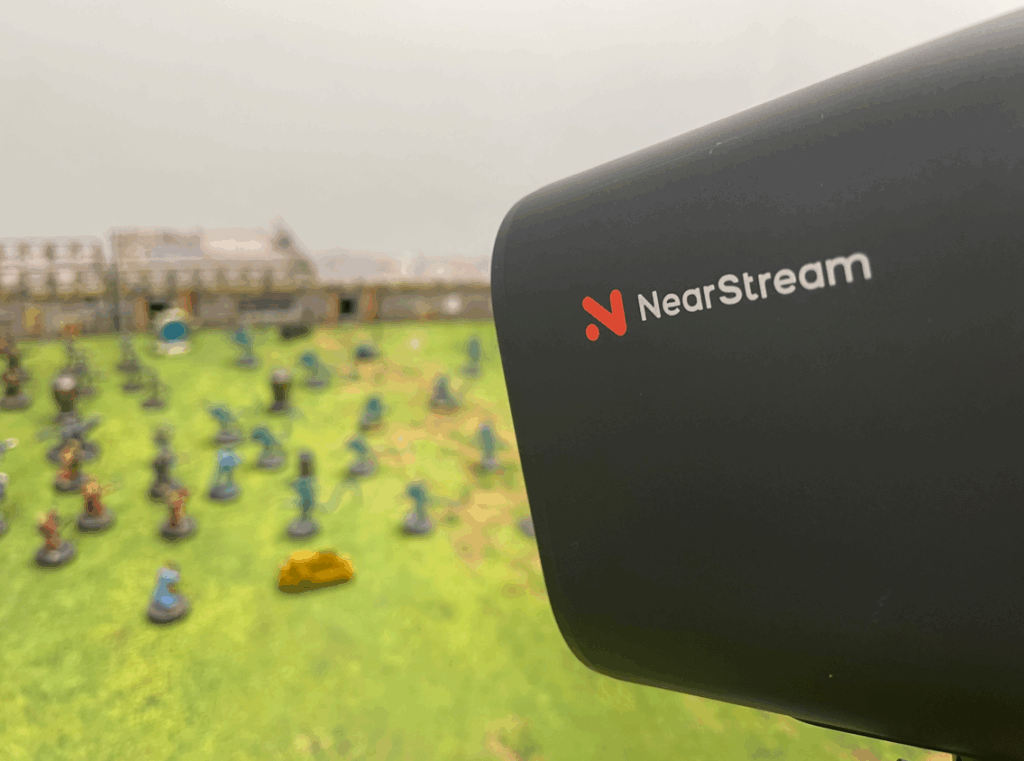
My two highly niche use cases were podcast equipment showcases and tabletop miniature battle reports.
These gave me the opportunity to play around with the remote control, which is a really handy addition to the camera. I was blown away by the clarity when zooming in from basically across the other side of the room. Once I hit the remote’s auto-focus button, I could see every small detail.
It also revealed every flaw in my miniature painting, which was a humbling experience and, to be honest, an incentive to improve.
NearStream’s All-In-One Podcasting Kits
The VM20 is just one of NearStream’s many offerings. I mentioned earlier that they specialise in modular kits – the idea being that you can bundle up everything you need to podcast, and know that they’ll all work together.
Their PodPro bundles have mics, interfaces, stands, cables, and cameras for solo, two-person, and four-person setups. While I personally feel I can get better deals (and a better overall quality of gear) by buying everything individually, there’s no doubt you can save time and headaches by just getting everything you need in one box.
Some folks have little interest in the nuances of tech and just need their kit delivered quickly and fuss-free, and that’s where bundle deals can really shine!

Is Video Creating 2 Different Types of Podcasting? Our Data Says It Is
Read article called: Is Video Creating 2 Different Types of Podcasting? Our Data Says It IsConclusion: NearStream VM20 Review
$250-$300* is a chunky investment, especially if you’re completely new to video, in which case, I’d be tempted to learn the ropes with what you already have.
But for folks who’ve already started to find their feet making video podcasts and are looking to experiment beyond split-screen talking head episodes, this could be a brilliant upgrade to your setup and your content.
I’ve certainly enjoyed using it to explore new creative opportunities. The NearStream VM20 didn’t just help me make Warhammer battle reports; it also revealed how sloppy my miniature painting can be, which has become an unexpected reason to try and sharpen up.
On a final note, if you’re looking to explore video podcasting in more detail, check out our full guide where we answer frequently asked questions, give more gear and software recs, and dispel a few myths along the way!
* Enter coupon code TPHNEAR5 at checkout to save 5%, and, at the time of writing, NearStream are offering an additional 31% off in their Black Friday sale!